Not sure if someone already brought this up somewhere, but I couldn’t find anything in the Memory League Forum about it, so I’ll give it a shot:
What is your opinion about the use of a digital metronome* in Memory League (or other digital memory competitions for that matter)? Should it be allowed, or do you believe it is important that we keep the same kind of settings as in the real world (ie that you have to browse through the data yourself)?
*When referring to a digital metronome in this scenario, I mean some kind of function that automatically shows you the next item(s) to memorize, instead of having a user manually click through the items. This function has been existing in the training mode on memocamp, although it hasn’t been available when competing there.
I see pros and cons with both approaches, so I personally don’t have any strong opinion about it, but I’m curious to hear what others have to say about this topic. What originally got me thinking about this is that my brain in training is able to memorize a deck of cards in 60 seconds, but only when the program is browsing through the cards for me at a set speed. When I have to manually browse through them, I’m not quite able to do that. Having this as a supporting digital tool would thus make it possible for me to memorize more, in less time, and I assume that it might be similar for others as well.
That’s an interesting idea. I think it would definitely make it easier to achieve new PBs if you could set your memorization time upfront and have the items automatically display at the appropriate rate. I’m curious too to see what other people think.
In case anyone is interested, I wrote a little script in AutoHotkey (an automation scripting language for Windows) that can be used as a “digital metronome” on the Memory League website. Feel free to check it out on the link below (and if you like it, I’d be happy to hear about it :D). I also included some easy-to-use instructions, so no need to be a programmer to use it (it only works for Windows, though).
And I would still be curious to hear what you think about my original question(s):
What is your opinion about the use of a digital metronome* in Memory League (or other digital memory competitions for that matter)? Should it be allowed, or do you believe it is important that we keep the same kind of settings as in the real world (ie that you have to browse through the data yourself)?
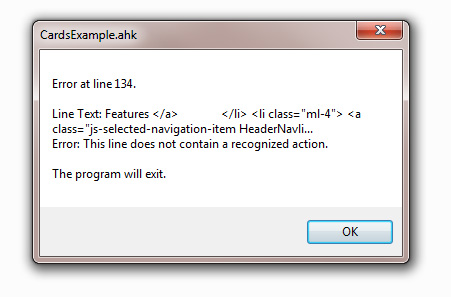
I’ve downloaded both the installer and the exe file, installed it, and then downloaded your sample script CardExample.ahk but when I run it, same as what you did in the video you did, it gives me an error. I use Windows 7, I tried it a few times but it just won’t work. Any ideas?
My script doesn’t have 134 lines (only 21), so I would say that the problem lies with how AutoHotkey is installed or configured on your Windows 7 machine. I’ve tried googling a bit, but it’s impossible to say exactly what is the issue without some trial and error.
Some links that I found (but where I have no clue if it will solve your issue):
I found the problem and the solution! Used it and loved it! Thank you.
When I downloaded the sample you did, I did a Save As and downloaded it, and somehow it added some extra lines, but when I copied the whole text and pasted into an ahk it worked!