Synesthesia Training Program (Letters and Numbers)

Im writing a really long else if statement so would be good to know if the colors are correct so i wont have to go back and change them. For example it looks like this

        if (letter == 'i' || letter == 'I'){
            return new Chunk(String.valueOf(letter), #f88734);
        }
        else if(letter == 'o' || letter == 'O'){
            return new Chunk(String.valueOf(letter), #cd641f);
        }

So is the HEX color f88734 always that for the letter i and I or does it change depending on the consecutive letter?

Okej, so i have created a GitHub project, anyone who wants to help can now do so. I have listed specifications in a bullet list that needs to be created, happy coding :D. The app will be in play store soon as well so you can try it out. The results from the conversion is quite poor though since i only focused on adding colors to the PDF text. To make the formatting look good will be the next step. PDFs that look similar to this will handle the conversion OK.

Here is the github page:
https://github.com/wayweary/PDFcoloring/tree/master

I wonder in terms of training synesthesia for letters if it would make more sense in terms of aiding memory to have words rather than letters have colors. For example Luria’s S. Speaks of a certain word as having an ugly yellow color. Maybe all words that begin with B would have a brown color, or some similar system. There might be more memory gains by not mimicking synesthesia for individual letters. I don’t see that this has been formally tested…

I don’t know if you’ve seen it but there is a perfectly working chrome extension for this.

When I red the article this was the first thing that I hoped somebody would develop, well they did :slight_smile:

The next thing is an ios ebook reader to do this (I don’t know if I want too much)

1 Like

Does not seem to work that well for me so far:

Doesn’t color comments, just everything around them. It also just seems to color vowels either red or green, leaving almost everything else normal. But when someone quotes:


It colors that. But still, only the vowels. i’s are blue.

Edit: My bad, you can actually set the colors in the options. Will check how well that works.
Also, when I had the extension on, I couldn’t edit this comment because it removed all the vowels from the whole page :evil:

I have added on 0-9, per the suggestions in the first couple comments, and will add on the other colors later, no time to find out each and every one now. If anyone already has a list, please share. That number synesthesia page looks very interesting. So many patterns. And if you think about it, you can right away see where every single 4 is, or every single 0, etc.
Bateman

Hello Bateman,

For numbers I’ve used the color setting proposed in one of the comments in this forum. But I need a color set for the rest of letters.

I’d appreciate if you can share your settings (what worked for you probably will work for me as well) The default colors of vowels in the extention is not satisfactory (e and o has similar colors etc.).

The only drawback of this extension is the colors selected may sometimes blend-in with the background and becomes hard to read. (Also for some reason I don’t know, it sometimes distorts the size of font) Maybe the coder will fix these in the later versions, but so far even this does the job.

Awesome sharing, works perfectly. We are gathering much tools now that could help one to experiment with this idea. I finally made a working version of a colorization app for my android, took a few books from gutenberg and made them colorful.

As for the color schema, i think Josh’s final version is quite good, maybe i even like some of the ones he proposed before the final version. Josh’s final version are very easy on the eyes, but i would like the colors to pop more, to give a more colorful impression… See Josh github page and open the style.css and you will see the HEX numbers he used for each letter. Than you can program them in the chrome extension. I will go trhough this thread again to see at all the color schemes Josh’s proposed, i think there was one that i like better than the final version.

Just look at this book with the extension on :)):
https://www.gutenberg.org/cache/epub/7849/pg7849.html

Thanks wayweary.

Akilligelisim, I had the same problem as you. Wayweary solved it. Here is Josh’s version:

n0, #n0 { color:#ffffff;text-shadow: #666 0.03em 0.03em 0.09em; }
.n1, #n1 { color:#ffea00;text-shadow: #ff6633 0.03em 0.03em 0.09em; }
.n2, #n2 { color: #0066ff; }
.n3, #n3 { color: #009900; }
.n4, #n4 { color: #000000; }
.n5, #n5 { color: #804000; }
.n6, #n6 { color: #008080; }
.n7, #n7 { color: #ff6633; }
.n8, #n8 { color: #660099; }
.n9, #n9 { color: #ff0033; }

.al, .Au, #al, #Au { color: #ffcd03; }
.bl, .Bu, #bl, #Bu { color: #0046c6; }
.cl, .Cu, #cl, #Cu { color: #66029f; }
.dl, .Du, #dl, #Du { color: #d00016; }
.el, .Eu, #el, #Eu { color: #e7a800; }
.fl, .Fu, #fl, #Fu { color: #5f4978; }
.gl, .Gu, #gl, #Gu { color: #037621; }
.hl, .Hu, #hl, #Hu { color: #65340b; }
.il, .Iu, #il, #Iu { color: #f88734; }
.jl, .Ju, #jl, #Ju { color: #1ab153; }
.kl, .Ku, #kl, #Ku { color: #9e0da7; }
.ll, .Lu, #ll, #Lu { color: #77132f; }
.ml, .Mu, #ml, #Mu { color: #723305; }
.nl, .Nu, #nl, #Nu { color: #5c4b78; }
.ol, .Ou, #ol, #Ou { color: #cd641f; }
.pl, .Pu, #pl, #Pu { color: #4362a7; }
.ql, .Qu, #ql, #Qu { color: #ae0253; }
.rl, .Ru, #rl, #Ru { color: #943b3d; }
.sl, .Su, #sl, #Su { color: #074664; }
.tl, .Tu, #tl, #Tu { color: #f10017; }
.ul, .Uu, #ul, #Uu { color: #AD7460; }
.vl, .Vu, #vl, #Vu { color: #1f4979; }
.wl, .Wu, #wl, #Wu { color: #745724; }
.xl, .Xu, #xl, #Xu { color: #070c7c; }
.yl, .Yu, #yl, #Yu { color: #077bbd; }
.zl, .Zu, #zl, #Zu { color: #d4308d; }

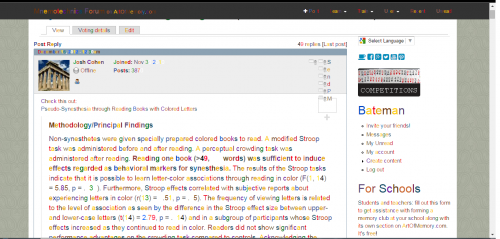
After applying those colors to the extension, this is how the page looks:

It works perfectly. The only things wrong with it so far are the editing bug, when I edit a comment it’s basically blank space now, only leaving characters like (*/) etc. Also, when background color isn’t white, it looks bad.

I’ll test it out for a while, will report back if I notice anything odd.

Bateman

Thanks bateman, however I don’t understand how you could enter the numbers with text shadow.

The extension only allows entering color codes

I dont think he has a shade for the numbers?? Or i can at least not tell from the picture.

No, I didn’t use the shading. As a result, 0’s are nearly invisible, as are 1’s.

Also, I didn’t notice any effects from this, other than discouraging me from reading things. Usually, I sometimes look through “junk” articles on “pop” websites, when they pop up on facebook or something, now I couldn’t even look at them. When I read comments and posts here, I mostly skipped through them, as opposed to reading the whole thing. When reading my couple favorite blogs, I read every word, but there was less enthusiasm. Perhaps the testing time wasn’t long enough, as well as the colors not being optimal for inducing synesthesia, but I didn’t notice anything positive or different other than that.

It’s just harder to read things when they’re like that. On a scale of 1-10. it reduces enthusiasm by 1.5-2 points.

Bateman

This is some exciting stuff; I have read through the post and want to pick some of your guy’s brains.
How do you see this ( as Bateman mentioned ) being helpful, i.e. what practical ways do you see this working itself out in?

Also how is it? Is it working? Have one of you been reading colorized texts and now you’re beginning to see that, A is beginning to be associated with Red, per say, even when you’re reading Black and white text. How long did it take for that association to develop?

I’m excited at the prospects of this project, and the gold we may get out of this, it would change many things I believe if these letters were “colored” in my mind.

I just realized I have been inducing synesthesia, so I can learn the guitar easier yet I haven’t even realized it!
I’m not going to fully explain the example until we’ve addressed my first post. I don’t want to leave too many strings untied, however I believe it’s a natural result of using mnemonics for a while. So perhaps after addressing my first post, I can share this exciting example with everyone.

This week’s Invisibilia podcast from NPR (Entanglement) deals with synesthesia especially mirror touch synesthesia including those that experience other people’s sensations or emotions!

1 Like

Halla!

I’ve edited the Chrome extension a bit, the coloring from Github style.css (Josh’s original?) is now default, added the shadows for 0 and 1. This will also color a few letters from the Cyrillic alphabet (same color as English equivalent). The only downside of this extension, for me, is that it is still slow with coloring a lot of text.

Synesthesia Chrome extension

Download link (zipped source):

How to use this?

  1. Extract the folder somewhere. You need to select this later.
  2. Go to chrome://extensions/
  3. Make sure you have “Developer mode” enabled (ticked) in the top right corner.
  4. Click “Load unpacked extension…”
  5. Select the extracted folder.
  6. You’re good to go. Enjoy! (or not)

Been backpacking for a while so havent had the time to try this fully yet but im planning to now. I finilized the app for Android just now, its mostly for personal usage but anyone who wants to try to experiment with this will probably find it usefull. You can find it here, i have only tried it on samsung note 4 and galaxy s2, so if it wont work for you please let me know and i will see what can be done :).

Josh, i hope it is OK that i used your schema in the app? Let me know otherwise.

@Bateman
Intressting that you tried it. How long did you give it before you quit? And did you only use it while reading websites (blogs, etc), i mean you didnt read a full scale book on gutenberg? I can imagine that it would become very messy to to use the extension while just surfing the web.
Do you have any advice for me before i try this out?


@Gebriell
Regarding your first post. I dont really know what the benefits are, or if there are any at all. I have experimented with this on and off while building my app. Some things i have noticed that could probably become great benefits are:

  • Faster find a certain word on a page. For example ‘awakened’, if i assosiate the letter k with neon blue i could instantly spot all the instanses where that letter is located on the page and therefore find the word awakened very fast.
  • Less re reading the previouse sentence/word. I read one sentence and move on to the next, but sometimes i feel the need to go back to previouse sentence. If it were in colors, i would be more confident that i got i right bc i would rememebter the colors of the last word. For example, the last words on a line is “computers”, when i moved to the next line i become unsure if it where computer or computerS. If the s was colorized in my mind, i would just remember that i saw that color on the last word and move on comfortabely.

Those two points are things i noticed while reading some stuff in colors. And i could say that for me, they would become huge benefits. I havent fully tried it yet though, so its really difficult to say. The results might be similar to what bateman experience too.

Another thing i notice was how find times certain letters occur on a page. For instance the letters K, Y, J are very uncommon. I dont know yet how this could be a benefit, but im certain it is.

What im hoping to gain is easier and better retention. If each page would have it distinct features because of how it look, than it should create a greater impression on the mind. For example, certain pages feel a bit scary (much red and dark colors) or happy (green, and yellow), or maybe some colors would form a figure.

Anyway, i will give this a try for the next couple of weeks, 20m reading before bed. I will use my own created color schema because i think that the one josh made isnt really optimal for this. I think its better to have very noticeble colors for the most uncomon consonants (neon green, red blue), and least noticable colors for vovels (dark yellow, brown etc). Most of the consonants should be easily spoted on a glance at the page, with joshes schema the most poping colors are A and E (which are quite useless bc they are so common) and G and T.

Around a week or so. Yes, only browsing the web. I have read longer articles though, 5000+ words at a time with it. On reflection, it was actually quite effective at blocking out useless junk. There are a lot of things on the web that I’m just ‘impartial’ about reading, but they don’t provide any useful, actionable advice. With this extension, I had to read slower, process more, and was more annoyed, thus it annoyed me enough at useless information that I stopped reading it. Interesting side effect for me.

Don’t really have any tips, try it out.

Bateman

1 Like

This is really interesting but how effective has it been for people? It does help associate letters with colors but I’m not sure how useful that actually is.

Thats a reasonable amount of time to try it. Did you ever stick with it for a longer period of time but in shorter duration? Maybe just reading with it 15 min a day or something?

I dont think enough people have given this a go yet to get a holistic view of if it is helpful or not. So far Bateman is the only one in this thread who has written about his experiment. I will begin my try today, spending about 15-30m every night reading “the number concept”. I will not read any newspapers/forums/etc with the extension though.