I have nothing against people making money off there software. But I expect plain dealing.
I shall have to put some time into one of them Probably Anki.
Thank you for your help.
I have nothing against people making money off there software. But I expect plain dealing.
I shall have to put some time into one of them Probably Anki.
Thank you for your help.
Wow, then you must be the Derek Banas from Bangladesh!
Really inspiring journey, thanks for sharing! 
New to this forum. Have been a programmer for the last 15 years. But, googling slows me down and makes simple tasks look huge. Got valuable insights from the conversation above.
Will work on my own alphabet PAO system and use some of the tricks mentioned above. Currently, trying to create a system for learning statistics to help with data analytics that I am looking to shift into.
Hi @elitely, @zvuv and everyone else on this thread. Thank you all for your input, this has been a fascinating discussion. It’s so nice to see fellow developers working on systems to help with using JS.
I am a javascript developer and for a long time have been trying to work out the best ways of turning concepts / code into images. Specifically, I want a system I can show to juniors to help them with the learning process. I can see how something like alphabet PAO would be of enormous use, and something I am going to look into. However, for someone who doesn’t have a menomincs background, would they bother learning a new system like this when they have a dozen other things they need to learn…
In an age where google is the answer to everything, can I ask which you find the most useful:
It seems to be a blend for me, but I am trying to avoid learning syntax structures as these take a lot of time, and don’t actually build the expertise I want. Concepts and project-steps seem to be the most useful.
With that said, there are some pieces of syntax / commands which are useful to memorise. Here is something I use for Github: Learning Git & GitHub visually. For many of us new to coding… | by Dev Kylo | Medium
Anyway, thanks for all the input guys. Let me know if anyone is based in London and wants to meet up and chat about this.
I’m still producing drawings - and that is working well. While it is a slow process, there’s a lot of engagement and by the time I’m done I know the stuff. I havent had to go back to Object.defineProperty docs since.
I think just the act of drawing the shapes, no matter how crudely helps give substance to abstractions, especially those one doesn’t quite understand yet. Color would be a big asset too. I just can’t draw in color - otherwise I’d add that. And you can go back to your sketches and embelish with more information.
However, this is material that is already familiar and pretty well understood - I plan to try my scheme on Python which I’ve ignored for too long. I find it hard to take a language that doesn’t use curly braces seriously.
I hope to be in London in a few month.
I don’t think,they will……….
I don’t ask my colleagues or subordinates to learn ‘mnemonic’ techniques of any kind. Because majority of them won’t! Not because they are not motivated to learn things that will improve their skills,but because we don’t want to do hard works!
Mnemonics is ‘hard work’!
Another problem is,it is very difficult to change ‘habits’ of any type. If a programmer is used to learning programming without mnemonics,then,it is gonna be very difficult for him/her to change his habit and get used to the ‘new habit’ of using ‘mnemonics’ for programming.
Habit determines a lot of our skill levels,but is one of the most difficult things to change!
It seems to be a blend for me, but I am trying to avoid learning syntax structures as these take a lot of time, and don’t actually build the expertise I want. Concepts and project-steps seem to be the most useful.
I think is all about ‘blending’. Also,I believe,what one will learn depends on one’s level of expertise, choice and needs!
For example,take this page of C# programming(Link). There are basically hundreds of different ‘string methods’ in the link. Let’s say,I want to memorize the widely used ‘string methods’ from that page. There could be around 20+ of them and I want to ‘encode’ all of them within one day in my memory. And I can surely do that by using ‘mnemonics’.
However,I can also memorize them without using mnemonics. But to do that,I have to spend a lot of times,even years. Because I am not gonna use the ‘string methods’ all the times,my memory will not encode them well. And that is why,I will have to refer to that link of methods all the times,or have to ask questions of ‘how to manipulate a string in a certain way’ in stackoverflow every now and then or search ‘google’. All this is time consuming and not efficient…
Here is a frequently used string method of C#(and many other languages): Substring(Int32, Int32)
To memorize this method and ‘when/how/why’ to use it,one might not need more than one minute with mnemonic techniques. The C# programmer has to use ‘integer’ for selecting the beginning and ending text! And he has to encode that in his memory. He has to memorize that he cannot use this format “Substring(a,b)”. He must use this integer format “Substring(2,3)”! Once encoded this string method with mnemonics(which is not gonna take more than a minute),the programmer will not easily forget the ‘hows/when/why’,etc of this string method.
I supervise around 60+ staffs of my company. We work for the 'Medical Billing and Coding" sector of U.S. So,our staffs need a very ‘good memory skill’,as there are thousands of ‘codes’(Alpha numeric) in Medical Coding sector of America. We also have to use ‘programming languages’ in our work for the client. And over the years,I have found that the ‘best’ staffs of my company have the ‘finest’ memory. I think,‘memory’ is the first thing that differentiates a skilled(!) employee from a non-skilled(!) one! Some people have ‘naturally good memory’ and they shine in their works. Others need to learn the skill of ‘memorization’. If they do,they could also become very skilled in their work(whatever that work is)!! Just my observation!!
Very inspiring @elitely!
I’ve checked the image with your spreadsheet. Amazing job!
I recognise a column with the letter-shapes 
I like your idea of Alphabet Pao. It’ll be very useful.
Thank you.
I took items of that “Letter Shape Column” from one of your posts. Credit goes to you.
Yes,I found this type of system to be very very useful. I have been applying the system on different areas of my life;and getting very positive result…For example,I love reading books(a lot of them). But I had difficultly remembering the main points of the book. Now,with the system,I can remember the main points of the book very well.
I also use this system for logging the main events of my life on monthly basis. This has helped me tremendously to understand what the heck is going on in my life! 
Not only in programming,I applied it to remember “Softwares”,too…ha…ha…
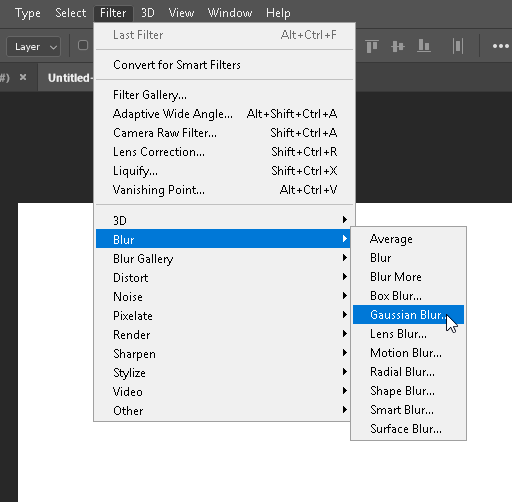
For example,let’s say,I want to learn how to apply ‘Gaussian Blur’ in photoshop. To do that,I have to get to “Filter>Blur>Gaussian Blur”.
Now,I can convert “Filter>Blur>Gaussian Blur” to “Fltr>Blr>Gaublr”
Then,with the Alphabet PAO system,I can create story with “Fltr>Blr>Gaublr”!
Pretty fun!!! We can easily remember shortcut keys of Photoshop using Alphabet PAO system!
Seeing its usefulness in my personal life,I got ambitious and I have started to create a more robust and massive “Alphabet PAO system”,though it is taking a lot of time and effort to complete this.
Above system is single digit,but now I am working on double digits Alphabet PAO system. See the image below(Person+Other)…I hope,I will be able to complete it within this year! 

Great job! I think you will complete it sooner than a year as it seems you are half way there already.
With my calculation, it’s 26x26 = 676
So by the looks of it, you’d need 676 Two-Letter-Combo with Persons and their actions and objects. It’s a lot of hard work, but then again everything is hard first before it’s very easy.
It’s like a brand new Major system but using all the letters of the alphabet.
I thought of something similar in the past, but was stuck with a single letter shape system instead as you know.
Initially I was converting each letter to a number digit, for example,
A = 1
…
Y = 25
Z = 26
So if the letters were;
A O Y
I would think of 1 and 15 and 25, and do the usual number pao.
This is the way I used to do it until I started using the letter shapes instead as I couldn’t distinguish the numbers and letters in the pao as they were all numbers.
So I think your system is more robust if learned and practiced well.
I am looking forward to see your completed Alphabet PAO. Hope you will share once completed.
Actually,it is 676 for persons. And 676 for ''others". That means,1352 images in total of persons,objects,animals,etc.
I’m using the Dominic system’s idea(Match the initial letters of the person’s name) for generating ''characters" and Major System idea(CVC) for generating “other”…
Sure,I will…
Awesome shares! could you share this data table here to download by any chance? I am working on one for international phonetic alphabet. so Sound to images, on this site I can click on the letter and it makes the sound. Want to get them 100% before focusing on the pao.
Hi,sorry for late reply…
Here is the Data Table for you to download>>> 00 Alphabet_PAO_System_Shared.xlsx - Google Drive