@Abdurasul7 @vishvaavishvaa1 @Brain75 @AlHouseen @MatteoCillo @Pat777 @siera5000 @QuaraMan @Coachdealtovuelo @mwilson @Canadianbeaut @Badr4sudan @NiklasMoonsun @AnnaFis @Gayankaa @Oleg_Cherednichenko @hallasrafik @Akash132 @mamoru23 @shubhanshu_tiwari @MindSponge @Goldfish @FrankGrube @dmitriyRubikscube @NataliaMalysheva @KennyK11 @Daclen @samdrew @ADILBOUNOUAR @LMac92 @daoud74 @iYusra @Wim_H @Danii @Cruz @NS-AH-Memory @Chicc8 @Annet.stupina @flipin-slayer @DanielK @Orikal0 @L_c @Xorx @Virender @Sava @hayato @Dasha @Alfonso @Jmsmithpsyd @Vy3wWuf9 @FelixA @katiek @Brainrunning @Simi @Cloud @8043 @shu2 @wmemory @Dorafarkas @Reallysure @Zoomy @Davronbek @liskaj @Log @mohamed22 @MyUsernameForumName @onehand @Dhawal-Sawant @Emilie26400 @kyglo @Ilana-Iz @llwys @RayanYousif @armandsen @Ashraf @makie @KomiljonMusayev @MohamedHossam25 @samirbaral07 @EricG @EduardoEDOG @Derby77 @Kentisland28 @collinr11 @SilvioB @DavidCantor @FerreiraDeodato @King2 @yunno @Sylle @Galina @tomhn999 @chris5 @adidaphat @comeon @YegorUsatov @Yas @Satara @Matthew_Coxon @Myanganbayar
Welcome to Season 26!
There are 5 divisions:
- Division 1 (8 competitors)
- Division 2 (12 competitors)
- Division 3 (16 competitors)
- Division 4 (17 competitors)
- Division 5 (48 competitors)
In divisions 2-5, each competitor will play 6 matches. The pairings have been chosen such that each competitor in the division has a similar variety of opponent skill levels.
In division 1, as there are only 8 competitors, everyone will play everyone else (7 matches each).
Arranging matches
1. Enter your availability
At the top right of the Matches page for your division, you will see an Availability button. Click the button to open the availability table, which shows a row for each hour until the end of the season, with columns for you and each opponent you haven’t played yet. Click the boxes in your column to indicate when you are available to play a match.
2. Schedule matches with your opponents
There are two ways to schedule a match:
- On the availability table, if you enter availability that matches one of your opponents, you will be asked whether you want to schedule a match at that time. Just click “Yes” to schedule the match.
- You can also schedule a match by entering the date/time directly into the Schedule field on the Matches page. This allows you to schedule a match that doesn’t begin on the hour, or at a time that your opponent has not indicated they are available.
When you schedule a match, your opponent will receive an email asking them to confirm or cancel. You will be notified by email when your opponent confirms or cancels.
Matches should be confirmed at least 12 hours before the match time where possible. If a match is confirmed later than that, and the original scheduler does not play the match, the match will be rescheduled.
3. Cancelling a match
To cancel a scheduled match, click the red Cancel button on the Matches page. Optionally, enter a reason for the cancellation, which can be seen by your opponent and the league administrators. Your opponent will be notified of the cancellation via email.
If the match was previously confirmed by both players, you will forfeit the match unless you cancel at least 4 hours in advance or provide a reason deemed acceptable by the league administrators.
Playing matches
Note: if you don’t have full access to Memory League, you must keep at least one game available to be able to play a league match. League games don’t count towards the daily limit, but you will not be able to play a match if you have used all your free games for the day.
Choice of events
The competitor whose name appears first has the first choice of event, then the choice alternates.
Challenge your opponent by clicking on their name (for example, in the Scheduled Matches section on the home page), then click Challenge.
Please note:
- A competitor cannot choose the same event twice.
- A competitor cannot choose International Names if they have already chosen Names.
- A competitor cannot choose Names if they have already chosen International Names.
Ending the match
The match ends when one competitor reaches 4 points with a 2-point lead, or when 8 games have been played. Here are all the possible results:
- 4 - 0
- 4 - 1
- 4 - 2
- 4 - 4
- 4.5 - 0.5
- 4.5 - 1.5
- 4.5 - 2.5
- 4.5 - 3.5
- 5 - 3
No-shows
If your opponent arrives between 15 and 30 minutes late for a scheduled match, you can choose to either play the match or take a 4-0 default win.
If your opponent is more than 30 minutes late for a scheduled match, you automatically win 4-0 (unless they have an excuse acceptable to the league administrators, in which case the match will be rescheduled).
Please send me a private message (or use the Contact Us page in Memory League) if your opponent does not show up for a scheduled match.
Videos for Divisions 1 and 2
Recording videos
Competitors in divisions 1 and 2 must record a video of each match, with your head, hands and screen visible.
At the start of the video:
- State your name, your opponent’s name, and the date.
- Show around the room.
- Show your ears, and any ear protection you will use.
Submitting videos
The winner of the match (or both competitors in case of a draw) should submit their video within 3 days of the scheduled match time. Upload the video to YouTube as an unlisted video, and email the link to [email protected].
The loser of the match does not need to submit their video, but they should keep the video until the end of the season in case it is requested by a supervisor.
Late video submissions
If a winning (or drawing) competitor submits their video between 3 and 7 days after the scheduled match time, their points for the match will be adjusted 1 point lower than usual.
If a winning (or drawing) competitor fails to submit their video within 7 days of the scheduled match time, they will score 0 points for the match, with no change to their opponent’s points. If this happens more than once, the competitor will be removed from the season and relegated.
Deadlines
The targets shown below are intended to keep the season moving and on schedule.
Competitors who fall two matches behind any target will be removed from the season, unless they contact the league administrators with an acceptable reason.
| Date | Target |
|---|---|
| End of week 1 (2026-03-22T23:59:00Z) | 1 match played and/or scheduled |
| End of week 2 (2026-03-29T23:59:00Z) | 2 matches played and/or scheduled |
| End of week 3 (2026-04-05T23:59:00Z) | 3 matches played and/or scheduled |
| End of week 4 (2026-04-12T23:59:00Z) | 4 matches played and/or scheduled |
| End of week 5 (2026-04-19T23:59:00Z) | 5 matches played and/or scheduled |
| End of week 7 (2026-05-03T23:59:00Z) | all matches played |
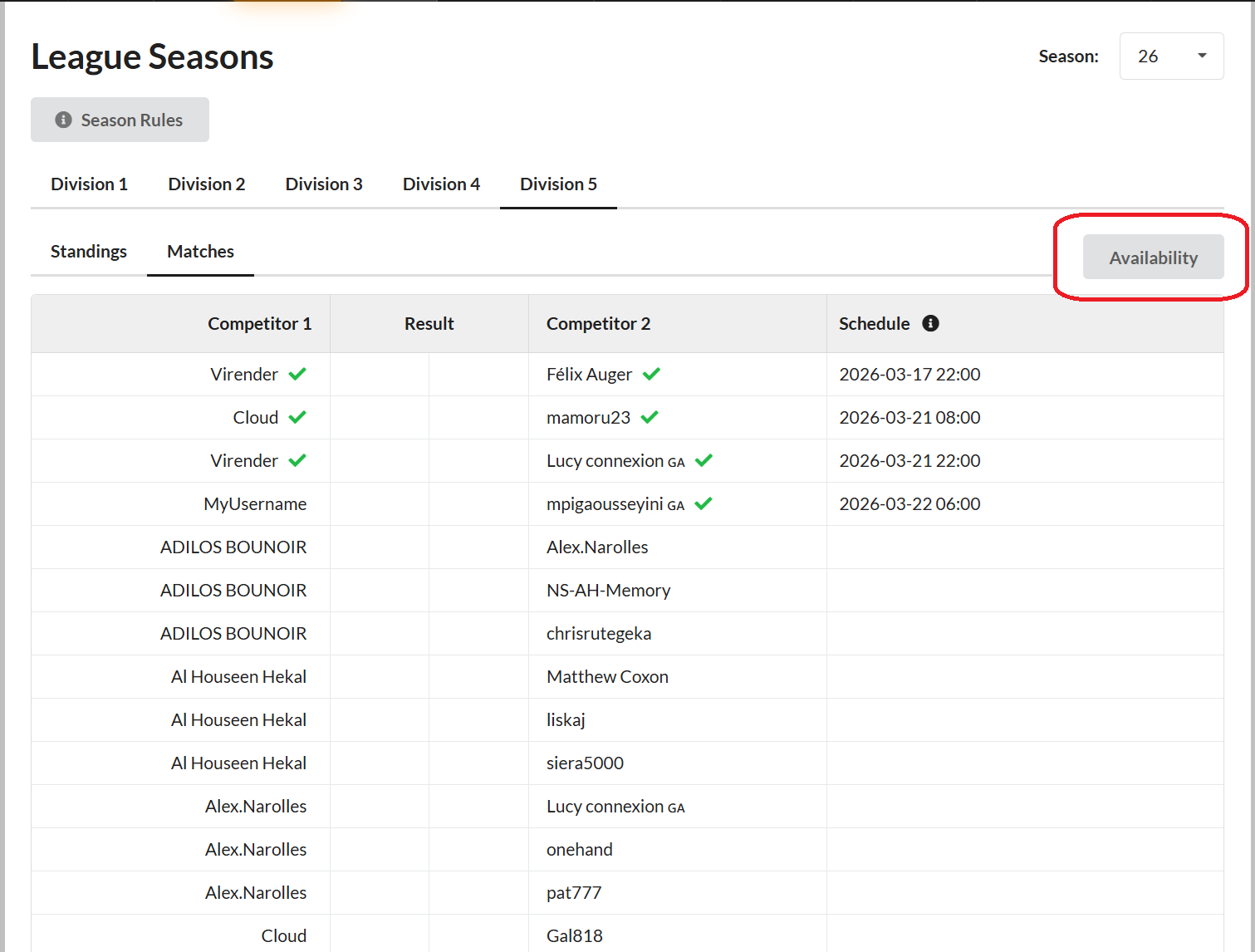
 ), but I don’t see a green V next to their name in the table. Does this mean the match is officially ‘on’, or am I still waiting for a secret signal?
