Here in Soviet Eastern Europe, it’s impossible to find index cards for sale. At best, you can find blank cardboard that has been hand cut to an approximation of square (not rectangle, well at least not intentionally), each card different than the rest. I had been wondering how they had survived the pre-computer age without index cards, but then I saw an old index file card cabinet (library style) for sale. One rectangular card with Russian writing was visible in a tray, so at least the Soviets had index card technology.
Anyway, I used index cards when I lived in America, where you can find them in any drugstore or Walmart. I used them for two basic tasks.
The first task was simply flashcards. Even though I used Anki too, sometimes I liked the physical aspect. You can do a nice approximation of Anki’s spaced repetition by having multiple bins. Each time you answer a question correctly, it goes one bin to the right. When you get it wrong, it’s reset to the first bin. Bins to the right should be reviewed less and less frequently.
The second task was tables of numbers that I needed. Why not put these tables on my phone? Because phones were forbidden where I needed the information. Sometimes I also didn’t want to look at the card when accessing the numbers, in which case the card would include a mnemonic. For example, you might have a 3x10 table of two digit numbers, so you write them using 10 lines of the index card, numbers arranged in 3 columns, and then associate PAO (person, action, object) to each row of 3 two-digit numbers. You can write the initials or full PAO names to the right of the table along with loci (memory palace) locations. For example, one row might be “90 50 99 | ND TD NN | entrance”. Fold the (small style) index card, stick it in your wallet, and it’s always there when you need the information or want to review the mnemonic, even if you don’t have your phone. I carried around a few such cards.
So, I didn’t really use index cards as indices.
However, I’ve just started a new note taking technique that appears promising as a kind of digital index card. I write notes and toss them into Evernote. It does Optical Character Recognition (OCR) better than anything else I’ve found, though it’s only for searching. For example, I can search for “Memory”, “System”, etc., and it will pull up this card (along with possibly others):
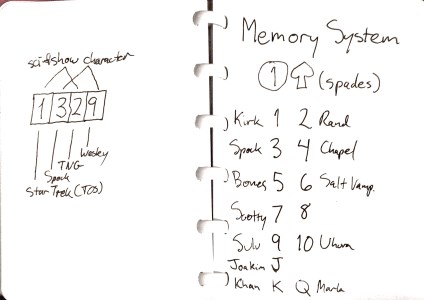
Evernote’s OCR is not perfect, here failing on “Kirk” and “Spock” but getting “Rand”, “Chapel”, and “Bones”. Interestingly, it finds “329” yet not “1329”, so I guess it doesn’t like 1’s with noses. It’s good enough to let me find a note on which I remember a few words. By the way, Evernote has a companion app called Scannable that makes the scanning easier and prettier.
I’m experimenting with two different physical note taking media. The above was done on a white board notebook, using dry erase markers, which come with erasers on the ends. After the note is scanned into Evernote, I mark it with a checkmark, so I know I can erase it. (Whiteboard notebooks are relatively expensive, so I would like to reuse the pages.) The other note media I’m trying is an A5 spiral notebook with tear pre-cuts and holes:
I use A5 rather than A4, because I don’t have much room around my computer keyboard, and also it’s easier to take a small notebook with me everywhere. So I can write notes in a notebook, then scan them into Evernote, then tear them out and stick them in an A5 binder. If I want to update a note later, I can search for it with keywords. The note needs to include an index, so I can find the physical note. It could be something like Luhmann’s Zettelkasten index, but I’d like the notes to be in a logical, readable order, so maybe more like Dewey Decimal. (I haven’t decided.) Then I can update the page and rescan it to Evernote.
All this is much better than my old system of multiple notebooks, each one for a different subject, mostly using only a few pages and difficult to find the notebook I want.
Combining notebooks and Evernote is an appealing blend of old and new, but I’m still new at Evernote, so I’m not sure where this will lead. Also, I’m nervous about privacy issues. Occasionally I have ideas worth a lot of money, and I don’t like having to think about whether it’s safe to put a particular note in Evernote. Evernote is most useful if you can everything there, but also most dangerous.