Some ideas:
Keyboard Shortcuts
I’m not familiar with Power BI, but one technique I use when using new programs is to learn the keyboard shortcuts as early as possible. It really speeds things up, especially once you get the information stored in muscle memory.
Many keyboard shortcuts have mnemonics built-in, like “p” for “paste” or “r” for “rectangualar selection box”.
If they don’t have easy names like that, I’ll learn them in pairs or small groups.
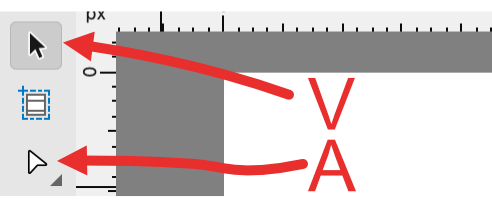
Example: one of the graphics programs I use has two arrow tools — one selects and moves things (v), and the other one manipulates nodes on vector images (a).
I didn’t use a specific mnemonic for those but only took a minute to focus on the difference between them and to consciously feel what it’s like to press each key to switch the tools.
If I had needed a mnemonic, I would have visualized the letters “V” and “A” as looking like pointing tools, because both tool-icons look kind of like arrows:
Whenever I have to do something with the software, I stop to hover over a tool to find out its keyboard shortcut, and I try to use those instead of clicking on things. I feel like it speeds up the learning process a lot, and make me much faster at operating the program than I would have been without the keyboard shortcuts.
Cheatsheets on Wall
There’s a text editor called Vim that I learned about 15 years ago. It’s like Notepad but with a user manual hundreds of pages long, and there are no buttons or mouse controls, so you have to store a lot of keyboard shortcuts in your mind and muscle memory. It’s almost like learning a language that you can use to “speak” with the text editor.
I printed up a few cheatsheets and taped them to the wall next to my desk. Whenever I needed to do something in Vim, I would force myself to not use the mouse but would look up the keybinding on the cheatsheets.
Here’s an example cheatsheet:
https://vim.rtorr.com/
Forcing myself to do that helped me get through the initial learning curve.
Learning by Task
Some things don’t have keyboard shortcuts, but they can be learned as steps in a task. If you can define a common task, like “remove background from image”, then you can make a list of the steps and practice a few times to get it in muscle memory and/or put the list into a memory palace or peg list.
There are some common tasks listed on this page:
- Connect to data
- Shape and combine data
- Group rows
- Pivot columns
- Create custom columns
- Query formulas
If I were going to learn the program, I’d probably start by putting the keybinding cheatsheet on the wall next to my computer, and making sure I could do all of the tasks in that list without looking up the answers. Then I’d find another list of tasks and start learning those. If the goal is a certification, then I’d look up what is required for the certification and make sure I could walk through all of those tasks.
Edit: here’s another list of common tasks: Free Power BI exercises